Cirkus Users are able to customize their own notification preferences. There are three types of Notifications:
Inbox - a notification to your Inbox within the Cirkus App
Email - an email sent to the Primary Email Address set under Preferences > General > Email Address
Push - a notification sent to your mobile device or any Mac OS (must have Cirkus app installed), or via Web Push to your browser (if permissions are enabled)
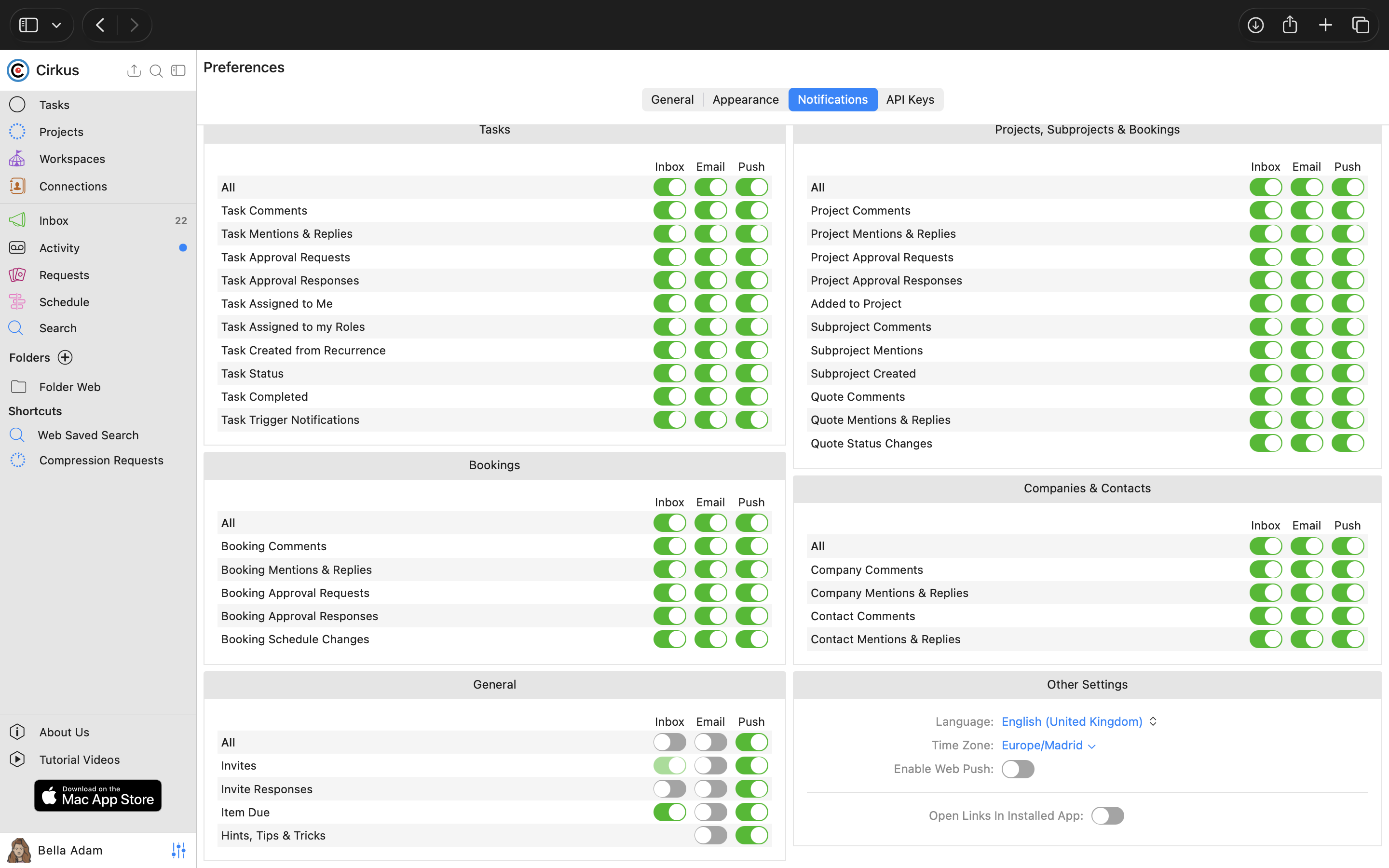
Below are all our possible Notifications and a description of the events that trigger them
General
Invites: you receive an invite that is pending your response
Invite Responses: an invite you sent has been accepted/denied
Item Due: a Project, Task, Milestone, etc. is due Today (“Today” in your Time Zone) (configurable reminders intervals for tasks - see Custom Due Date Reminders)
Hints, Tips & Tricks: occasional helpful info sent to you from Cirkus
Projects, Subprojects & Bookings
Project Comments: comment is made on a Project you are a member of
Project Mentions & Replies: you are mentioned (@) or replied to in a comment/field on the Project
Added to Project: you are added as a member of a project
Project Approval Request: a Project Request you are the Approver of is created and pending approval
Project Approval Response: a Project Request you created has been approved/denied by the Approver
Subproject Comments: comment is made on a Subproject in a Project you are a member of
Subproject Mentions & Replies: you are mentioned (@) or replied to in a comment/field on the Subproject
Subproject Created: Subproject has been created in a Project you created
Booking Comments: comment is made on a Booking you created or are assigned to
Booking Mentions: you are mentioned (@) or replied to in a comment/field on the Booking
Booking Schedule Changes: a Booking you are involved in has been modified (the creator will not be notified)
Booking Approval Request: a Booking Request you are the Approver of is created and pending approval
Booking Approval Response: the Booking Request you created has been approved/denied by the Approver
Tasks
Task Comments: comment is made on a Task you created or are assigned to
Task Mentions & Replies: you are mentioned (@) or replied to in a comment/field on the Task
Task Approval Requests: the Task Request you are the Approver of is created and pending approval
Task Approval Responses: a Task Request you created has been approved/denied by the Approver
Task Assigned to Me: you are set as the assignee of a Task
Task Assigned to my Role: Roles you belong to are set as the assignee of a Task
Task Created from Recurrence: a new Task is created from a reoccurrence of a Task you created
Task Status: status of the Task you are the assignee of is modified on your behalf
Task Completed: a task you created has been set to the status of "Done"
Task Trigger Notifications: Condition occurs for a Trigger that includes notifying you as an "action"
Companies & Contacts
Company Comments: comment is made on a Company you created
Company Mentions & Replies: you are mentioned (@) or replied to in a comment/field on a Company
Contact Comments: comment is made on a Contact you created
Contact Mentions & Replies: you are mentioned (@) or replied to in a comment/field on a Contact
Other
Open Links in Installed App: open Cirkus links automatically inside the Cirkus app installed on your device
Time Zone: Knowing your time zone helps Cirkus to send Booking and Item Due notifications with the correct time
(Web Only) Enable Web Push: turn this on to receive Cirkus notifications directly for your user in this browser. When enabled, your browser will ask for permission to send notifications (example from Chrome) click Allow to activate. If the push notifications are blocked, the toggle will not stay ON.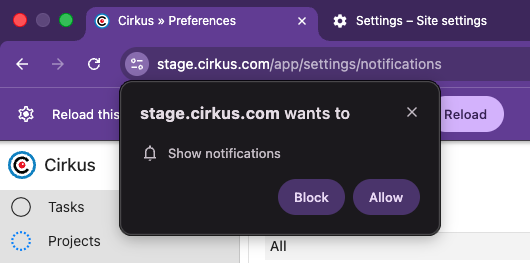
You can check the status of websites which are allowed to send push notifications in your browser settings
Chrome: Go to Settings > Privacy and security > Site settings > Notifications.
Edge: Go to Settings > Cookies and site permissions > Notifications.
Safari: Go to Settings > Websites > Notifications.
Language: Knowing your Language helps Cirkus to send email notifications with the correct language
Was this article helpful?
That’s Great!
Thank you for your feedback
Sorry! We couldn't be helpful
Thank you for your feedback
Feedback sent
We appreciate your effort and will try to fix the article