This article applies to cirkus.com
Workspace License Tiers (“Seats”)
For Members in your workspace, the following License Tiers are available
Pro
This is the "default" tier for users.
Pro users can have Administrator, Member or Limited permission profiles applied at Workspace and Project Level
Business
The business tier is the only tier that allows enabling Rates and Quotes permissions
Business users can have Administrator, Member or Limited permission profiles applied at Workspace and Project Level
Lite (not available on cirkus.com, private cloud only
Lite users can only be Lite permission profile on Workspace and Project Level.
Lite tier users also have "Can Book: No One" booking permissions
You can filter by Tier type and see counts in the Workspace > Members list
Workspace Permission Profiles
After selecting the applicable Tier, different permission levels can be applied to each Business or Pro Member: Administrator, Member or Limited.
Lite tier users have a fixed Lite permission.
The following permissions are applied are the defaults, they can be modified on private clouds
| Workspace Permission Applied | Business Admin | Business Member | Business Limited | Pro Admin | Pro Member | Pro Limited | Lite^ |
|---|---|---|---|---|---|---|---|
| User can see Workspace membership details | ✔ | ✔ | ✖ | ✔ | ✔ | ✖ | ✖ |
| User can add/modify/remove Workspace memberships and roles | ✔ | ✖ | ✖ | ✔ | ✖ | ✖ | ✖ |
| User can delete the Workspace | ✔ | ✖ | ✖ | ✔ | ✖ | ✖ | ✖ |
| User can see Workspace Resource details | ✔ | ✔ | ✖ | ✔ | ✔ | ✖ | ✖ |
| User can add/modify/remove Workspace Resources | ✔ | ✖ | ✖ | ✔ | ✖ | ✖ | ✖ |
| User can edit Workspace details | ✔ | ✖ | ✖ | ✔ | ✖ | ✖ | ✖ |
| User can create Projects | ✔ | ✔ | ✔ | ✔ | ✔ | ✔ | ✖ |
| User can see all Projects | ✔ | ✔ | ✖ | ✔ | ✔ | ✖ | ✖ |
| User can see all Bookings (Even if they are not in the project or Involved in the Booking) | ✔ | ✔ | ✖ | ✔ | ✔ | ✖ | ✖ |
| Can Book Anyone & All Resources | ✔** | ✔** | ✔** | ✔** | ✔** | ✔** | ✖ |
| Can Request to Book Anyone & All Resources (for Approval) | ✔ | ✔ | ✔ | ✔ | ✔ | ✔ | ✔ |
| User can see Workspace Companies | ✔ | ✔ | ✖ | ✔ | ✔ | ✖ | ✖ |
| User can add/modify/remove Workspace Companies | ✔ | ✔ | ✖ | ✔ | ✔ | ✖ | ✖ |
| User can see Workspace Contacts | ✔ | ✔ | ✖ | ✔ | ✔ | ✖ | ✖ |
| User can add/modify/remove Workspace Contacts | ✔ | ✔ | ✖ | ✔ | ✔ | ✖ | ✖ |
| User can see limited users in the Workspace | ✔ | ✔ | ✔ | ✔ | ✔ | ✔ | ✔ |
| User can see quotes | ✔ | ✔ | ✔ | ✖ | ✖ | ✖ | ✖ |
| User can add/modify/remove quotes | ✔ | ✔ | ✔ | ✖ | ✖ | ✖ | ✖ |
| User can see rates on quotes, members, roles and resources | ✔ | ✔ | ✔ | ✖ | ✖ | ✖ | ✖ |
| User can modify rates on quotes, members, roles and resources | ✔ | ✔ | ✔ | ✖ | ✖ | ✖ | ✖ |
| User Can See Dashboards | ✔ | ✔ | ✖ | ✔ | ✔ | ✖ | ✖ |
| User Can Create/Edit Dashboards | ✔ | ✔ | ✖ | ✔ | ✔ | ✖ | ✖ |
*All permissions can be customised on a private cloud, these examples are for defaults and on cirkus.com
** These are the defaults but can be configured to be less on an individual Member level e.g Can Book: Self
^ Lite users are not available on cirkus.com, on private clouds the default permission is Can Book = No One and this can be changed .
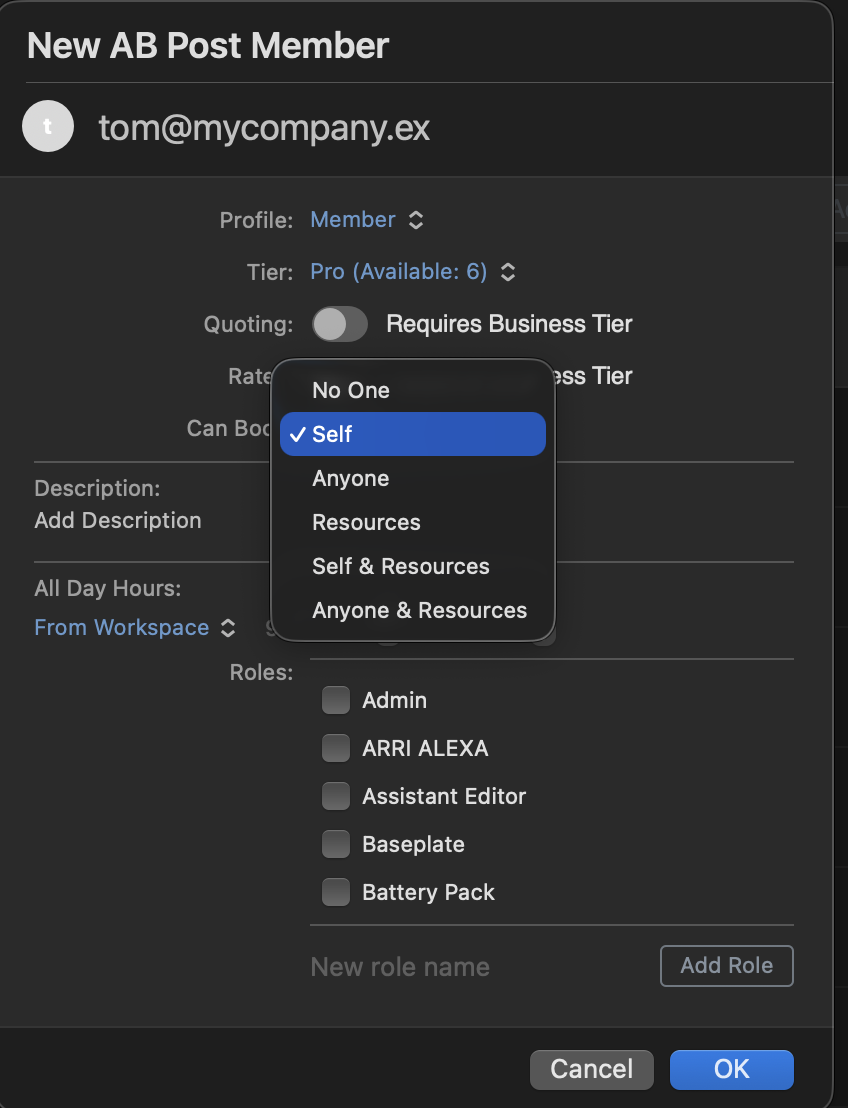
Members can also be added to Projects with different permissions to their Workspace one.
e.g a Workspace Member could be Administrator on their own Project
Lite Workspace Members cannot have any other Permission profile applied, they are Lite Project members always.
On cirkus.com* the following permissions are applied
| Workspace Permission Applied | Admin | Member | Limited | Lite |
|---|---|---|---|---|
| User can delete the project | ✔ | ✖ | ✖ | ✖ |
| User can add/modify/remove memberships and roles | ✔ | ✖ | ✖ | ✖ |
| User can edit the name, display name, type, description, and all other basic project details | ✔ | ✖ | ✖ | ✖ |
| User can view all tasks in the project (not only tasks where the user is involved) | ✔ | ✔ | ✖ | ✖ |
| User can create tasks on the project | ✔ | ✔ | ✔ | ✖ |
| User can permanently delete tasks on the project | ✔ | ✔ | ✔ | ✖ |
| User can view the project’s activity (feed, comments) | ✔ | ✔ | ✖ | ✖ |
| User can view the project’s attached files | ✔ | ✔ | ✖ | ✖ |
| User can see ALL bookings linked to the project | ✔ | ✔ | ✖ | ✖ |
| User can see limited users in the project | ✔ | ✔ | ✔ | ✔ |
*All permissions can be customised on a private cloud, these examples are for cirkus.com
Related Articles
- Working with External Collaborators and Freelancers
- Create a Workspace
- Quotes
- Manage your cirkus subscription
- Cirkus Deployment Options
Was this article helpful?
That’s Great!
Thank you for your feedback
Sorry! We couldn't be helpful
Thank you for your feedback
Feedback sent
We appreciate your effort and will try to fix the article